

Using Workflows
Workflows are a convenient method for running graphs of asset-processing jobs.
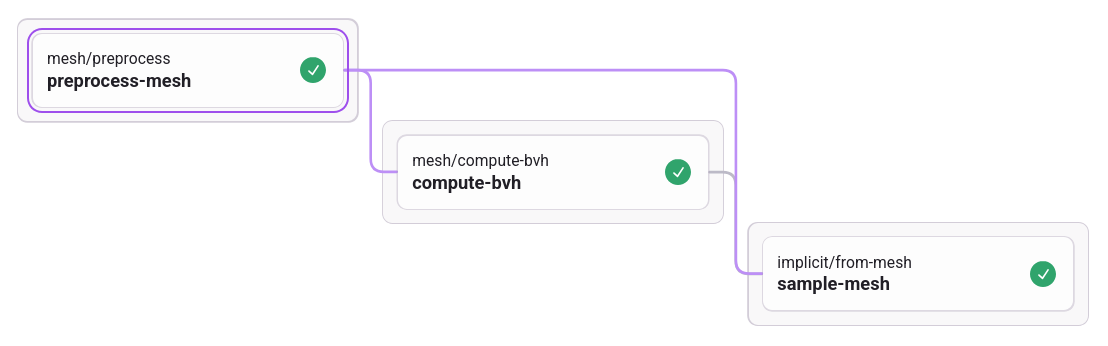
Workflows are configured in YAML. Here is an example of a workflow definition for converting a tessellated mesh file to a signed distance field (SDF) sampled onto a grid:
---
jobs:
  preprocess-mesh:
    type: mesh/preprocess
  compute-bvh:
    type: mesh/compute-bvh
    needs:
    - preprocess-mesh
    assets:
      mesh: preprocess-mesh
  sample-mesh:
    type: implicit/from-mesh
    needs:
    - preprocess-mesh
    - compute-bvh
    assets:
      mesh: preprocess-mesh
      bvh: compute-bvh
...
Workflows are composed of a graph of asset-processing jobs. Each job may receive a number of input assets and parameters and will often output at least one asset and some accompanying parameters. Input/output details for each job may be found on the workflow dashboard.
Workflow configurations are intended to establish dependency connections between jobs,
leaving only required input assets and parameters to be specified at dispatch. For
example, the workflow definition above connects the mesh output from preprocess-mesh
to both compute-bvh and sample-mesh. The job mesh/preprocess itself receives an
input mesh asset, which is specified when making a POST request to dispatch the
workflow.
Dispatching workflows
const body = JSON.stringify({
  // YAML-encoded configuration
  definition: "...",
  assets: {
    // Filename of uploaded asset
    "preprocess-mesh.mesh": "part.stl",
  },
  parameters: {
    "preprocess-mesh.center": "bounding_box",
    "sample-mesh.resolution": "512",
  },
});

fetch("...", {
  headers: {
    "Content-Type": "application/json",
    // ...
  },
  body,
});
Assets/parameters may be assigned at dispatch by specifying the job name and
corresponding asset/parameter name separated by a . character.
When the workflow is complete, users are free to then query job inputs and outputs using the usual job querying endpoints to retrieve any intermediate/resulting assets and computed parameters.
While configurations may be dynamically generated as needed, clients gain the most mileage through repeated usage of preset configurations. This is not dissimilar to declaratively-configured continuous integration and deployment (CI/CD) setups (e.g. GitLab, GitHub), but instead of files checked-in to Git, our inputs are assets that have previously been uploaded to the Metafold REST API.
Additional notes
- Parameters must be encoded as strings, e.g.
"[0.0, 0.0, 1.0]"for a list with 3 float values
YAML Syntax Reference
This section explains the YAML syntax used to configure workflows. See some common workflow examples in our Python SDK.
Root keywords
These keywords live at the root of the YAML document.
jobs
Mapping from unique, user-defined names to job configurations. See Job keywords.
- Job names must not contain any
.period characters
We recommend giving each job a short, descriptive name to indicate its role in the workflow (which may not always be obvious from the job type).
Job keywords
The following headings describe the keywords required to configure workflow jobs.
type
Job type. The full list of available job types and their input/outputs may be found on your workflow dashboard.
needs
List of upstream dependencies for this job. If a job has any upstream dependencies, the required output assets or parameters from the upstream job must be specified in the assets or parameters mapping.
assets/parameters
Mapping between input assets/parameters from this job, to output assets/parameters from
any upstream job listed in needs. Upstream assets/parameters may be specified in
short form if the upstream job has only one output, e.g.:
assets:
  mesh: upstream-job
If the upstream job has more than one output, the mapping must be provided in long form to disambiguate between outputs. In long form, the mapping must specify both the job name and the output asset/parameter name. For example:
assets:
  mesh:
    job: upstream-job
    asset: result